.svg)


Table of Contents
- Introduction to Bio Link Landing Page Builder
- Why Use a Bio Link Landing Page Builder?
- Key Features to Look For
- Step-by-Step Guide to Creating Your Page
- Design Best Practices
- Common Mistakes to Avoid
- Comparison of Popular Bio Link Builders
- Fees and Hidden Costs
- Key Takeaways
- Frequently Asked Questions
- Conclusion
Introduction to Bio Link Landing Page Builder
If you’re looking to simplify your online presence and consolidate your multiple links into one easily accessible page, using a Bio link landing page builder is a smart move. In 2026, these tools continue to gain popularity, especially among content creators, businesses, and social media users who want to share all their important links through a single URL. This beginner’s guide will walk you through the essentials of what a bio link landing page builder is, how it works, and how you can create your own optimized landing page.
Why Use a Bio Link Landing Page Builder?
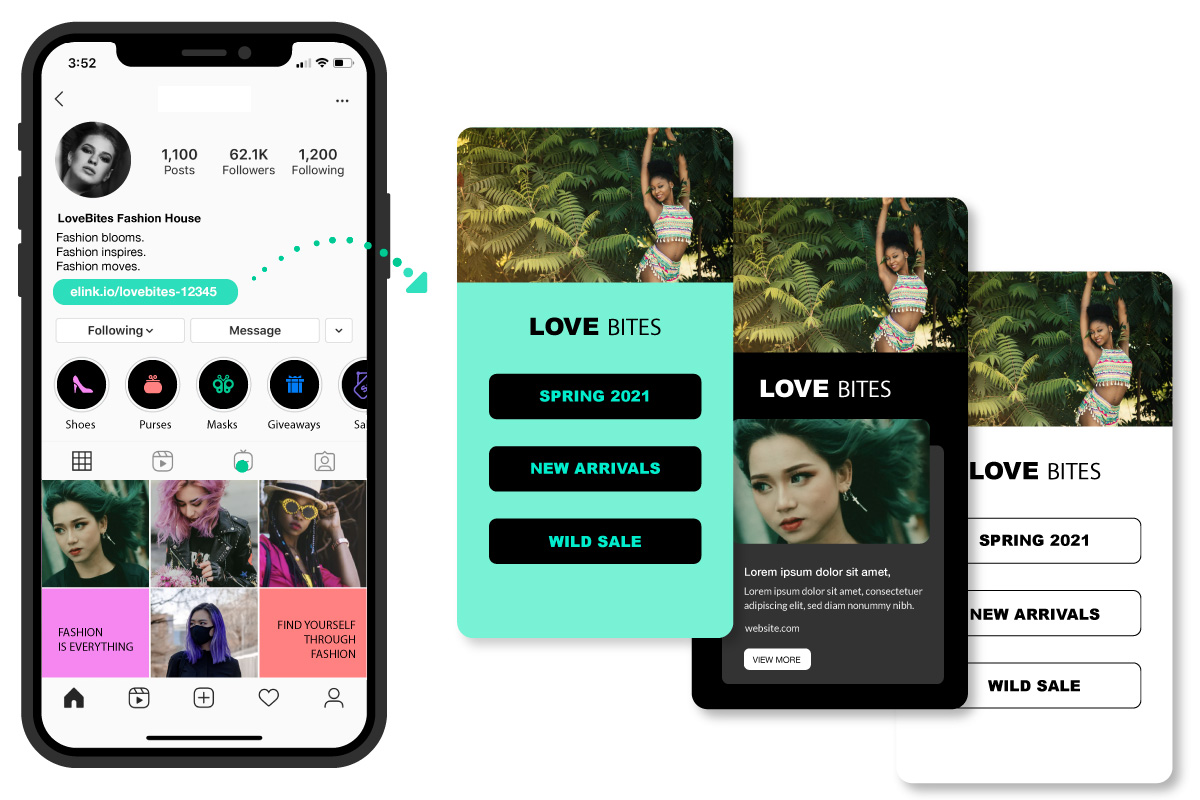
You might wonder why a bio link landing page builder is necessary when you can simply share individual links. The answer lies in convenience and effectiveness. Platforms like Instagram, TikTok, and Twitter limit you to a single bio link, making it challenging to direct followers to multiple destinations such as your website, blog, store, or social profiles.
A bio link landing page builder helps you create a centralized hub to showcase all your important links in one place. This approach increases engagement, improves user experience, and can even enhance your SEO by driving traffic more efficiently.
Key Features to Look For
When selecting a bio link landing page builder, you should consider these essential features to ensure your landing page is effective and user-friendly:
- Customization Options: Ability to personalize colors, fonts, and layouts to align with your brand.
- Mobile Responsiveness: The landing page should look great and function well on all devices.
- Analytics Integration: Track clicks and engagement metrics to optimize your links.
- Social Media Integration: Easy addition of social icons and links.
- SEO-Friendly URL and Metadata: Helps improve search engine visibility.
- Easy Link Management: Add, remove, or reorder links without hassle.
Step-by-Step Guide to Creating Your Page
Creating your bio link landing page is straightforward if you follow these steps carefully:
- Choose Your Builder: Select a bio link landing page builder that meets your needs. Popular options include T-ME’s own platform, which offers beginner-friendly tools.
- Create an Account: Sign up with your email or social login.
- Customize Your Profile: Add a profile picture and a brief bio to introduce yourself or your brand.
- Add Links: Include all relevant URLs such as your website, blog, store, or social media pages.
- Design Your Page: Use available templates or customize colors and fonts to match your identity.
- Publish and Share: Once satisfied, publish your landing page and update your social media bio with the new URL.
Design Best Practices
To maximize engagement and usability, keep these design tips in mind:
- Keep it Simple: Use clean layouts and avoid clutter.
- Prioritize Important Links: Place your most important or highest-converting links near the top.
- Use Clear Call-to-Actions: Make link buttons stand out with contrasting colors.
- Consistent Branding: Use your brand colors and fonts for recognition.
- Test on Multiple Devices: Ensure mobile and desktop versions look and work perfectly.
Common Mistakes to Avoid
While using a bio link landing page builder, watch out for these pitfalls:
- Overloading your page with too many links, which can overwhelm visitors.
- Neglecting mobile optimization, which can alienate most users who browse on phones.
- Failing to update links regularly, resulting in broken or outdated destinations.
- Using generic or inconsistent branding that reduces trust and recognition.
- Ignoring analytics data that could help refine your link strategy.
Comparison of Popular Bio Link Builders
| Feature | T-ME | Builder A | Builder B |
|---|---|---|---|
| Customization | High | Medium | Low |
| Mobile Responsiveness | Yes | Yes | No |
| Analytics | Included | Paid Add-on | Not Available |
| Price | Free / Premium | Free / Premium | Free |
| Ease of Use | Beginner Friendly | Intermediate | Basic |
Fees and Hidden Costs
Most bio link landing page builders offer a free tier with essential features but may charge for advanced customization, analytics, or additional links. Be wary of the following potential costs:
- Subscription fees for premium plans.
- Costs for removing platform branding or ads.
- Transaction fees if you integrate e-commerce links.
- Fees for custom domains or additional storage.
Always review the pricing details carefully before committing to a plan. For financial planning, consider resources like NerdWallet and official guidelines from Federal Reserve for best practices in digital budgeting.
Key Takeaways
- A Bio link landing page builder consolidates multiple links into a single, user-friendly page.
- Customization, mobile responsiveness, and analytics are critical features.
- Follow a step-by-step approach for setup and design to maximize impact.
- Avoid common mistakes like overloading links and neglecting updates.
- Understand potential fees and select a builder that fits your budget and goals.
Frequently Asked Questions
What are the best alternatives to Bio link landing page builder?
Popular alternatives include Linktree, Tap.bio, and Campsite. Each offers unique features and pricing, so choose one that matches your customization and analytics needs.
How long does approval usually take?
Most bio link landing page builders provide instant approval upon account creation. Some may require verification if you connect payment or custom domain services, which can take up to 24-48 hours.
What mistakes should I avoid?
Avoid cluttering your landing page with too many links, neglecting mobile optimization, and failing to update outdated links. Also, ensure your branding is consistent and clear.
What is Bio link landing page builder and how does it work?
It is a tool that helps you create a single landing page containing multiple links. You share one URL instead of many, directing visitors to your social media profiles, websites, stores, and other online destinations.
Is Bio link landing page builder a good idea in 2026?
Yes, as digital content consumption grows, having a centralized bio link landing page remains an efficient way to engage your audience and streamline your online presence.
What documents do I need?
Generally, no special documents are required to create a bio link landing page. However, if you upgrade to premium plans or use custom domains, you may need identification or payment documentation.
What are the common fees and hidden costs?
Free plans are common, but premium features such as advanced analytics, custom branding removal, and additional links may incur subscription fees. Check the pricing terms carefully to avoid surprises.
How do I qualify for Bio link landing page builder?
Qualification is usually straightforward: anyone with an email address can sign up. For advanced features, you may need to meet payment or identity verification requirements.
Conclusion
Using a Bio link landing page builder is an effective way to enhance your online presence in 2026. By choosing the right tool, following best practices, and avoiding common errors, you can create a clean, professional landing page that drives engagement and simplifies how you share your digital content. Start building your bio link landing page today and make it easier for your audience to connect with everything you offer.
For more information, visit our About page or reach out via Contact.
Related topics you might find useful include Optimizing Social Media Profiles and Digital Marketing Strategies. For further reading on economic impact and financial planning, consider Investopedia and Federal Reserve.